

Microsoft Defender Attack Simulator: Strengths, Weaknesses and the Reality of Security Awareness
Published Date:
- June 11, 2026
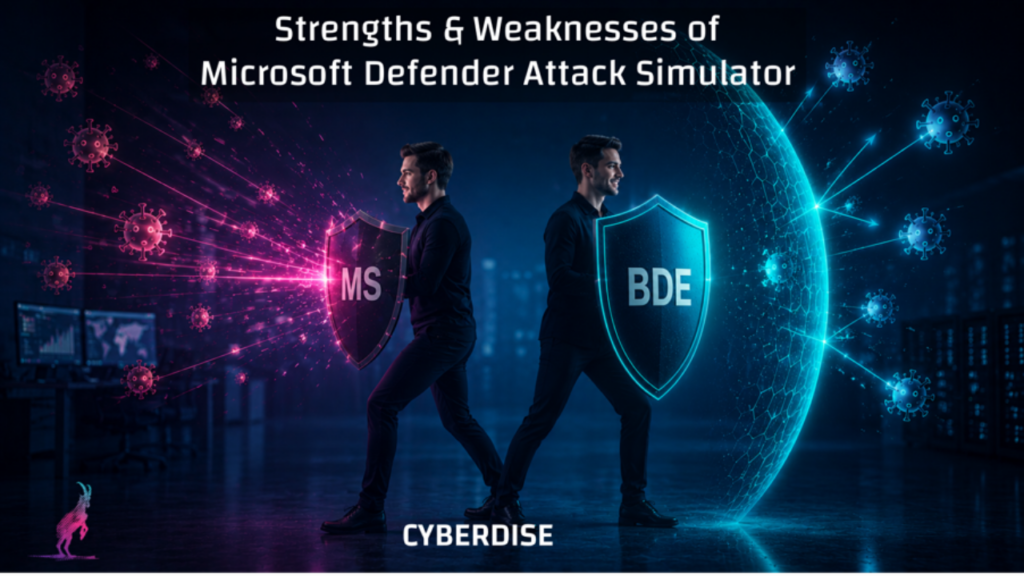
Is Microsoft Defender Attack Simulator Enough?
Microsoft Defender for Office 365 includes its own phishing simulation and awareness platform called Attack Simulation Training. Because it is deeply integrated into Microsoft 365, many organizations automatically assume it is the logical choice for phishing simulations and employee awareness.
And honestly: in some areas, Microsoft Defender Attack Simulator is very good.
But there is also another side that organizations should understand before replacing specialized awareness platforms completely.
This article is intentionally balanced. There are clear advantages — but also structural limitations that become visible very quickly in larger or more mature security environments.
The Positive Side of MSFT Defender Attack Simulator
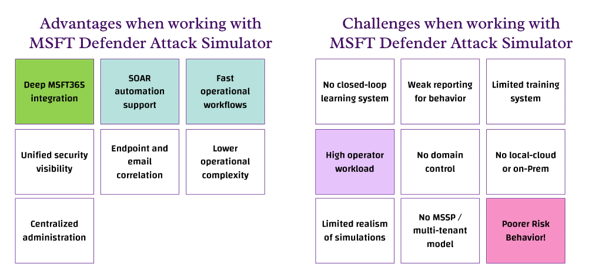
Let’s start with the advantages of this solution, which aren’t necessarily unique selling points, since other providers may offer the similar features or benefits:
- Deep Microsoft 365 Integration and it’s free
- It should have faster Operational Response
- SOAR and Automation Capabilities
- combined Endpoint and Email Visibility
- Lower Complexity for Existing Microsoft Customers
- Centralized Security Operations, buts always within one domain.
1. Deep Microsoft 365 Integration and it’s free for E5
This is the biggest obvious advantage and also the main reason why many organizations choose it. Of course, the Defender ecosystem is tightly connected with M365, Exchange Online, Defender for Endpoint, Active Directory / Entra ID, Microsoft Sentiner and Microsoft Security Incidents. Security teams can operate almost everything from one ecosystem instead of managing several disconnected products. and having the right license it comes for ‘free’.
2. Faster Operational Response
When a malicious domain, sender or URL must be blocked, Microsoft environments can often react extremely quickly.
Instead of switching between multiple vendor consoles, administrators can:
- investigate, block, automate, quarantine and monitor
from a mostly unified security environment. During active incidents, operational speed matters, especially in times of speedy AI-driven attacks.
3. Native SOAR and Automation Capabilities
One strong aspect of the Microsoft ecosystem is the possibility of automation.
Organizations can automatically react to reported phishing emails, malicious indicators, suspicious messages and of course also user reports with the phish-button. The admin can establish automated actions such as:
- E-mail recall
- mailbox cleanup
- incident escalation
- automated remediation workflows
This level of native integration is difficult for most external awareness vendors to replicate.
4. Combined Endpoint and Email Visibility
Phishing attacks do not stop at email. The combination with Defender for Endpoint gives Microsoft an advantage because organizations can correlate:
- email activity
- endpoint activity
- browser behavior
- malicious connections
- identity events
5. Lower Complexity for Existing Microsoft Customers
For organizations already standardized on Microsoft security technologies, Defender Attack Simulator reduces additional operational overhead, they get everything from a one-stop shop.
There is:
- less vendor management
- fewer integrations
- fewer external platforms
- simpler licensing alignment
For some organizations this simplicity might be a benefit.
6. Centralized Security Operations
Security teams often prefer centralized visibility instead of fragmented tooling. Microsoft Defender as a whole allows administrators to combine:
- incidents
- awareness campaigns
- alerts
- endpoint telemetry
- email analysis
- automation
inside a broader security ecosystem. If you are part of an organization which has the size, structure and the appropriate system-landscape that operational consolidation is a advantage.
Interim conclusion: The strength of the Microsoft Attack Simulator lies in its integration into the Microsoft Defender stack, especially with Microsoft Sentinel.
The Weak Side of Microsoft Defender Attack Simulator
As a reminder: The approach described here focuses on improving employees’ risk behavior and the “Attack Simulator” product offered by Microsoft for this purpose. We identified following challenges when using it:
- No closed-loop learning system
- High operator workload
- Limited realism of simulations
- Weak reporting for behavior
- No domain management & control
- No MSSP / multi-tenant model
- Limited training system
- No local-cloud or on-Prem Choice
1. No Closed-Loop Learning System
One of the largest weaknesses is the absence of a true behavioral closed-loop learning model.
Most phishing simulations stop after:
- click detection
- credential submission
- basic user assignment
But sustainable awareness improvement requires:
- continuous adaptive learning
- learning reinforcement
- behavioral repetition
- custom, contextual training and sophisticated exercises
- own attack domains
- long-term learning cycles
Without that, phishing simulations risk becoming repetitive compliance exercises instead of actual behavioral improvement systems.
2. High Operator Workload
Although Microsoft integrates well technically, awareness operations themselves can still require significant manual effort.
Especially in larger environments:
- campaign management
- targeting
- scheduling
- reporting interpretation
- training coordination
- campaign closing across multiple AD tenants
are time consuming. Dedicated awareness platforms are often significantly more optimized for awareness operations themselves.
3. Limited Realism of Simulations
Modern real life phishing attacks increasingly use AI-generated language, business context, supplier impersonation, personalized communication and multi-stage interaction
Many Defender Attack Simulator campaigns still feel relatively standardized compared to modern real-world phishing campaigns. They still rely on templates with basic customization and offer limited personalization.
The realism gap becomes increasingly important as attackers improve.
4. Weak Reporting for Behavior
In Microsoft Defender AST, reporting focuses on click rates and compromise rates. Click rates alone are not behavioral intelligence. Organizations need visibility into:
- reporting behavior
- hesitation patterns
- repeat behavior
- learning progression
- risk-based user groups
- long-term awareness trends
Microsoft reporting is functional, but relatively limited compared to specialized awareness analytics platforms.
5. No Domain Management & Control
Sophisticated phishing simulation programs often require:
- dedicated phishing domains
- domain reputation management
- landing-page control
- sender infrastructure management
- advanced campaign customization
Microsoft Defender Attack Simulator offers only limited flexibility in this area. Once an organization’s awareness program is no longer in its early stages, this becomes a serious problem. The use of static phishing simulation domains renders the campaigns ineffective and unrealistic.
6. No MSSP / Multi-Tenant Model
This is a major limitation for:
- Companies owning multiple AD Domains or LDAPs
- MSSPs
- managed SOC providers
- multi-customer security providers
Microsoft’s awareness tooling is primarily designed around individual tenant operation. Large-scale multi-tenant awareness management is not one of its strengths. This flaw drives high operator workloads at every stage of an awareness activity, from setting up to reporting and improving.
7. Limited Training System
Awareness is not only phishing simulation. In Microsoft Defender, training is based on built-in modules with limited customization options.
Defender Attack Simulator remains heavily simulation-focused. The broader educational ecosystem is relatively limited.
8. No Local-Cloud or On-Prem Flexibility
Microsoft Defender Attack Simulator runs only in the Microsoft cloud. Organizations with hybrid infrastructure, regulatory restrictions, local-cloud requirements or on-premise dependencies encounter ‘limitations’ at the best case.
Microsoft Defender Attack Simulator is naturally optimized for Microsoft cloud-centric environments.
9. Defender SAT Alone Will Never Solve Poor Risk Behavior
This is not only a Microsoft problem — it affects large parts of the awareness industry.
The narrative that trained users alone stop phishing attacks is unrealistic. Without strong technical controls such as:
- advanced email filtering
- endpoint protection
- browser security
- identity protection
- automated detection
users would be completely overwhelmed, of course. Especially with AI-generated phishing, technical detection becomes more important again not less. Nevertheless, companies will be quicker to implement technological safeguards through systems. Fostering sound risk behavior among people, on the other hand, is a much more time-consuming endeavor, and conventional / false awareness does not help in this regard.
Summary: Pros and Cons Overview
Advantages Microsoft AST
- Deep Microsoft 365 integration
- Native SOAR automation
- Faster operational workflows
- Unified security visibility
- Endpoint and email correlation
- Lower operational complexity
- Centralized administration
Limitations Microsoft AST
- No closed-looping learning system
- High operator workload
- Limited realism of simulations
- Weak reporting for behavior
- No domain management & control
- No MSSP / multi-tenant model
- Limited training system
- No local-cloud or on-Prem
- Conventional Awareness is not enough
Conclusion
Microsoft Defender Attack Simulator is operationally strong inside the Microsoft ecosystem. But organizations should not confuse phishing simulations with complete security awareness maturity and people who demonstrate a good risk behavior.
It is up to the procuring organization to decide which aspects of cyber security are a priority for it. The fact is that, in the age of AI, attacks are much more sophisticated and occur much more quickly. However, while companies will be able to control and master the technological side more quickly, doing so with people is a much more protracted endeavor.
Comparison of Microsoft Defender Attack Simulator (AST) to CYBERDISE Behavioral Defense Engineering (BDE)
There are third-party products that integrate very well into existing system architectures. This can, for example, largely offset the advantage of MSFT AST’s tight integration into the Microsoft stack. CYBERDISE Behavioral Defense Engineering (BDE) was specifically designed and built for such scenarios. Below is a product comparison based on the points covered in this document.
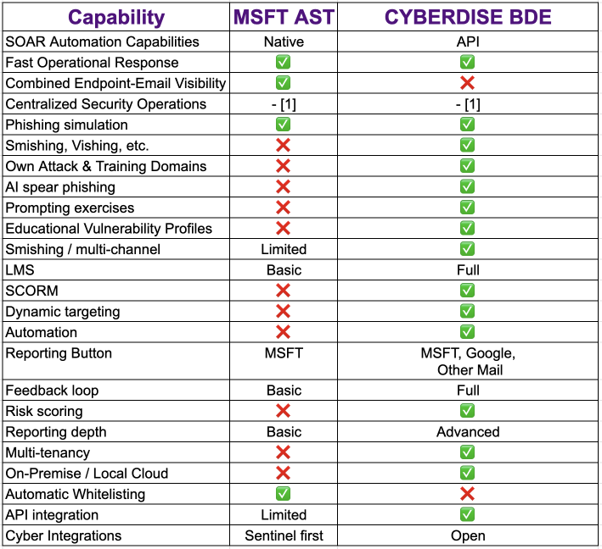
Those who want to read a more provocative meaning, here’s another article about MSFT Defender Attack Simulator. https://cyberdise-awareness.com/microsoft-defender-attack-simulator-what-is-wrong-with-it/
[1] The benefits of centralized security operations: We strongly question these benefits from an awareness view. From our perspective, this is more seen as a weakness. The Microsoft administrator is often not a very effective awareness engineer; such tasks are better handled by individuals with different skill sets. And we view the fact that the attack simulator is “buried” in the Defender console — and is therefore often out of reach for awareness specialists — as a clear disadvantage. For this reason, it was not evaluated.